
- Каталог оборудования Siemens
- Каталог продуктов Siemens Industry
- Приводная техника
- Техника автоматизации
- Системы автоматизации
- Системы визуализации SIMATIC HMI
- Обзор систем отображения и контроля
- Программное обеспечение SIMATIC HMI
- SIMATIC WinCC (TIA Portal)
- SIMATIC WinCC flexible - программное обеспечение разработки
- SCADA система SIMATIC WinCC
- SIMATIC WinCC
- SIMATIC WinCC V7.0
- Software Packages for SIMATIC IPC
- WinCC опции
- WinCC/B.Data
- SIMATIC Information Server
- SIMATIC Logon
- SIMATIC powerrate
- SIMATIC Process Historian
- WinCC/TeleControl
- WinCC/Advanced User Administrator
- WinCC/Calendar Scheduler
- WinCC/Connectivity Pack
- WinCC/Event Notifier
- WinCC/IndustrialDataBridge
- WinCC/IndustrialX
- WinCC/ODK
- WinCC/PerformanceMonitor
- WinCC/ProAgent
- SIMATIC ProAgent
- WinCC/Redundancy
- WinCC/SES (Sequence Execution System)
- WinCC/Server
- WinCC/User Archives
- WinCC DataMonitor
- WinCC WebNavigator
- WinCC/WebUX
- WinCC/WebUX
- WinCC/Web Navigator
- WinCC Add-ons и работа с партнерами
- SCADA-System SIMATIC WinCC Open Architecture
- Диагностика процесса
- Лицензии на программное обеспечение
- Программное обеспечение Update Service
- Заказные продукты
- Основные аксессуары HMI
- WinCC/DataMonitor
- Устройства отображения и контроля
- Панельные компьютеры SIMATIC Panel PC
- Программное обеспечение SIMATIC ProTool
- Системы идентификации
- Промышленные коммуникации SIMATIC NET
- Промышленные аппараты управления SIRIUS
- Промышленные информационные технологии
- Управление на базе РС
- Системы управления процессом
- Контрольно-измерительные приборы
- Анализаторы процесса
- Блоки питания SITOP
- Продукты для специальных требований
- Energy
- Автоматизация и безопасность зданий
- Низковольтная коммутационная техника
- Технология безопасности
- Системные решения и продукты для отраслей
- Сервис
WinCC/WebUX
- Заказные данные (10)
- Информационные материалы
Информационные материалы
WinCC WebUX
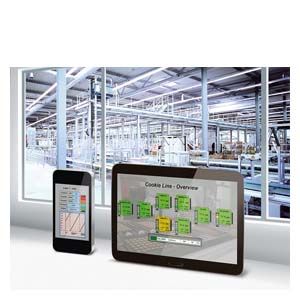
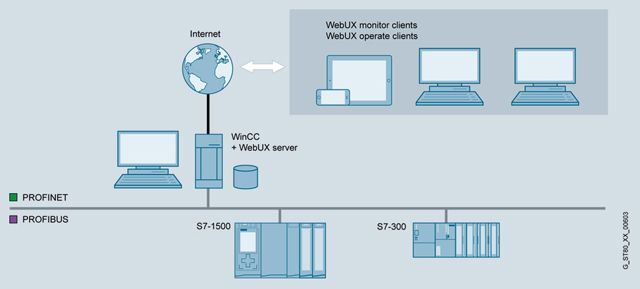
The WinCC WebUX option permits mobile, platform and browser-independent operator control and monitoring via the Internet or the in-house intranet or LAN.
WinCC WebUX is delivered with the WinCC system. Following installation, the WinCC Runtime system operates as WinCC WebUX server.
The images for the WinCC WebUX are created using the graphic editor. The WinCC picture is stored in the corresponding format in the project through the "Web-capable" picture property. Using the service platform IIS (Internet Information Server), the files are made available for the Internet.
No installation on the client is required for using the WebUX. WinCC WebUX can be used independent of the industrial sector, for example in service for the acknowledgment of alarm messages, in quality assurance for monitoring important production data, or in management for obtaining a quick overview of key production figures.
The WebUX Server itself does not require a basic license. Clients that are simultaneously logged into the server are licensed. Regarding licensing, it is differentiated between Monitor clients (read only) and Operate clients (reading and writing of values). WinCC WebUX can be used immediately due to a free Monitor client that is included in the WinCC package.
Функции
- Language selection by setting the Web language in the User Administrator
- Support of following WinCC objects:
- Most WinCC standard objects and WinCC pipe objects
- WinCC Smart objects (picture window, I/O field, graphic object, status display, text list, multi-line text, combo box, list box)
- WinCC Windows objects
- The following WinCC controls are supported:
- WinCC AlarmControl
- WinCC OnlineTrendControl
- OnlineTrend Web Control
- OnlineTable Web Control
- Ruler Web Control
- Slider Control
- Digital/Analog Clock Control
- Gauge Control
- WebBrowser Control
- Dynamizations by means of VB script or via the dynamics dialog
- User administration via SIMATIC Logon
- System events for user logon and logoff
Note:
Browser-dependent display is occasionally possible Minor differences in display and behavior are possible for the different browser versions.
Please also note the supported functionalities in the respective documentations.
Особенности
WinCC Engineering
- Fast configuration using the graphic editor
- No expensive training in Web technologies is required due to the use of WinCC standard tools
- Can be used without complex additional configuration on the client
Maintenance, servicing and IT
- No WinCC-specific installation on the clients required
- No WinCC-specific maintenance at the data terminal equipment required
- The WinCC WebUX server version and version of the mobile clients do not have to be the same
- Standard user authorizations on the client suffice
Line management and plant operator
- Mobile operator control and monitoring using commercially available mobile devices
- Uniform look and feel both on the mobile devices and on the WinCC station
- Secure communication via HTTPS und SSL certificates
- No entry costs, since a Monitoring client is included in the WinCC package
- Flexible licensing due to additive, Floating Client licenses
- Secured plant data as a basis for decision-making
Highlights
- Can be used on HTML5-capable and SVG-capable data terminal equipment without installation on the client