
- Каталог оборудования Siemens
- Каталог продуктов Siemens Industry
- Приводная техника
- Техника автоматизации
- Системы автоматизации
- Системы визуализации SIMATIC HMI
- Системы идентификации
- Промышленные коммуникации SIMATIC NET
- Промышленные аппараты управления SIRIUS
- Системы
- Коммутационные аппараты SIRIUS
- Аппаратура защиты
- Фидеры и пускатели двигателей
- Функциональные, коммутирующие реле и преобразователи
- Оборудование безопасности
- Позиционные выключатели и выключатели для систем безопасности
- Устройства управления и индикации
- SIRIUS ACT pushbuttons and indicator lights
- Actuators and indicators, 22 mm, round, plastic, black
- Actuators and indicators, 22 mm, plastic with metal front ring, matte
- Actuators and indicators, 22 mm, metal, shiny
- Actuators and indicators, flat, 30 mm, metal, matte
- Actuators and indicators, customized designs
- Holders
- Modules for actuators and indicators
- Enclosures
- Accessories
- Кнопки и индикаторы
- Двуручный пульт управления SIGUARD
- Тросовые выключатели SIGUARD
- Ножной выключатель SIGUARD
- Сигнальные колонны SIGUARD
- Встраиваемые индикаторы SIGUARD
- SIRIUS ACT pushbuttons and indicator lights
- Планирование и конфигурирование для SIRIUS
- Блоки питания SITOP
- Блоки питания SIRIUS 4AV
- Transformers
- Фильтры SIDAC-F
- Дроссели SIDAC-D
- Промышленные информационные технологии
- Управление на базе РС
- Системы управления процессом
- Контрольно-измерительные приборы
- Анализаторы процесса
- Блоки питания SITOP
- Продукты для специальных требований
- Energy
- Автоматизация и безопасность зданий
- Низковольтная коммутационная техника
- Технология безопасности
- Системные решения и продукты для отраслей
- Сервис

Inscription labels for enclosures
- Заказные данные (113)
- Информационные материалы
Информационные материалы
The labeling plates in size 22 mm x 22 mm can be attached to enclosures with cutouts for labels. There are versions in black with white print or silver-colored with black print.
Inscription
The inscription is in upper/lower case, all words begin with upper case letters. Graphic symbols, including those not listed in the catalog, are according to ISO 7000 or IEC 60417.
For customized inscriptions, see "Options".
Опции
Customized inscriptions
The labels can be inscribed with texts and symbols not listed in the ordering data.
A letter height of 4 mm is used for text inscriptions (1 to 3 lines).
Up to 11 characters per line are possible. The typeface used is Arial. Other letter heights and typefaces are possible, but must be specified when ordering.
Examples for customized inscription
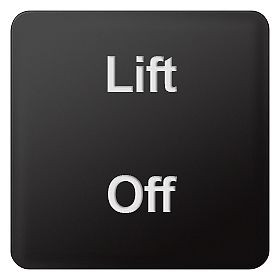
Two-line inscription in upper/lower case lettering (Q0Y)
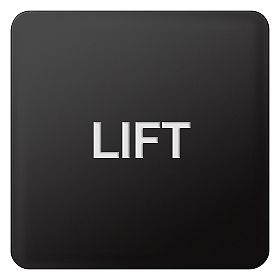
Single-line inscription in upper case lettering (Q1Y)
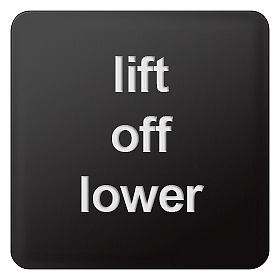
3SB39 backing plate for enclosures, customized inscription (Q2Y)
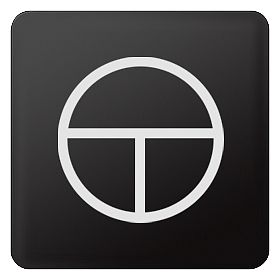
Symbol number 5011 according to IEC 60417 (Q3Y)

Any symbol according to order form supplement (Q9Y)
Ordering notes
Append the following order codes to the Article No.:
- Q0Y: Text line(s) in upper/lower case, upper case always for beginning of line (e.g. "Lift / Off"):
- Q1Y: Text line(s) in upper case (e.g. "LIFT"):
- Q2Y: Text line(s) in lower case (e.g. "lift / off / lower")
- Q5Y: Text line(s) in upper/lower case, all words begin with upper case letters (e.g. "On Off"):
- Q3Y: Symbol with number according to ISO 7000 or IEC 60417
- Q9Y: Inscription of choice, text or symbol, can only be ordered via SIRIUS ACT Configurator with a Configuration Identification Number (CIN)
When ordering, specify the required inscription in plain text without spaces, in addition to the Article No. and order code. In the case of special inscriptions with words in languages other than German, give the exact spelling and specify the language.
For long words you can also specify the end-of-line division. In the case of multi-line inscriptions, the text must be assigned to the respective line, e.g. Z1=Lift, Z2=Lower (see ordering example 1).
Symbols can also be ordered with numbers according to ISO 7000 or IEC 60417 (see ordering example 2 and 3).
The SIRIUS ACT Configurator must be used to select special inscriptions and symbols (order code Q9Y). In this case a CIN (Configuration Identification Number) is generated for placement of future orders.
It is then possible to place an order directly using the CIN and the SIRIUS ACT Configurator (Mall shopping cart) or via the standard ordering channels.Standard ordering channels:
- Industry Mall
- Configurator: http://www.siemens.com/sirius-act/configurator
- Electronic Catalog CA01 on DVD
- Industry Mall: http://www.siemens.com/industrymall
Ordering example 1
A label with 2 lines of text is required:
3SU1900–0AF16-0AZ0
Q1Y
Z1=LIFT
Z2=LOWEROrdering example 2
A label inscribed with symbol No. 5011 according to IEC 60417 is required:
3SU1900–0AF16–0AZ0
Q3Y
Z=5011 IECOrdering example 3
A label inscribed with symbol No. 1118 according to ISO 7000 is required:
3SU1900–0AF16–0AZ0
Q3Y
Z=1118 ISO